If you’ve been hearing the term “Headless Drupal” and wondering what the fuss is about, I want to explain it the simple way — based on how I actually use it in my day-to-day work, not just the textbook definition.
What Headless Drupal Really Means
In a normal Drupal website, Drupal does everything. It stores your content, it decides how the page looks, and it sends the finished HTML page to the visitor’s browser. Content and design are stuck together.
Headless Drupal breaks that link. Drupal still stores and manages the content, but it stops caring about how that content looks on screen. Instead, it just hands out the content as JSON data through an API. Something else — a website, a mobile app, or even an internal tool — picks up that JSON and decides how to display it.
In my current work, this is exactly the setup. Drupal sits in the back as the content engine, and the JSON it produces is used by the website, the mobile app, and a few internal systems too. One piece of content, created once, reused everywhere.
Why This Setup Works So Well
The biggest win for me has been translations. My client needed content in two languages — English and Arabic — and some projects need even more. Drupal’s multilingual module makes this genuinely easy. Editors just create the translation inside Drupal like normal, and it flows out through the API automatically. No separate translation system needed.
Beyond that, this approach helps everyone on the team in a different way:
For content editors — They keep using the Drupal editing screen they already know. They’re not touching code or worrying about how a page is laid out. They write content once, and it shows up on the website, the app, wherever it’s needed.
For developers — We get to pick the best tool for the frontend job. In my case, that’s Next.js. It means faster, more interactive pages, and a cleaner separation between “the content” and “the presentation.” When something breaks, it’s much easier to know which side the problem is on.
For the end user — Pages load faster, and each device gets an interface built specifically for it, instead of one design being squeezed to fit everything.
How I Actually Build It
Here’s the part that isn’t usually explained in the intro guides — how this looks in practice.
I lean heavily on the Paragraphs module for content structure. Instead of one big text field, content is broken into individual “paragraph” blocks — a banner, a text-and-image section, a card grid, and so on. Editors can then add, remove, or reorder these blocks freely, and the page rebuilds itself accordingly.
My usual workflow looks like this:
- The business or design team shares a new design for a section.
- I create a matching Paragraph type in Drupal for that section (and sub-paragraphs if the design needs them).
- I set it up to accept the right mix of media and text, and map those fields to match the design.
- On the frontend, I work alongside the team to build a matching React/Next.js component for that paragraph type, styled to match — I’m not just handing this off, I’m in the frontend code too.
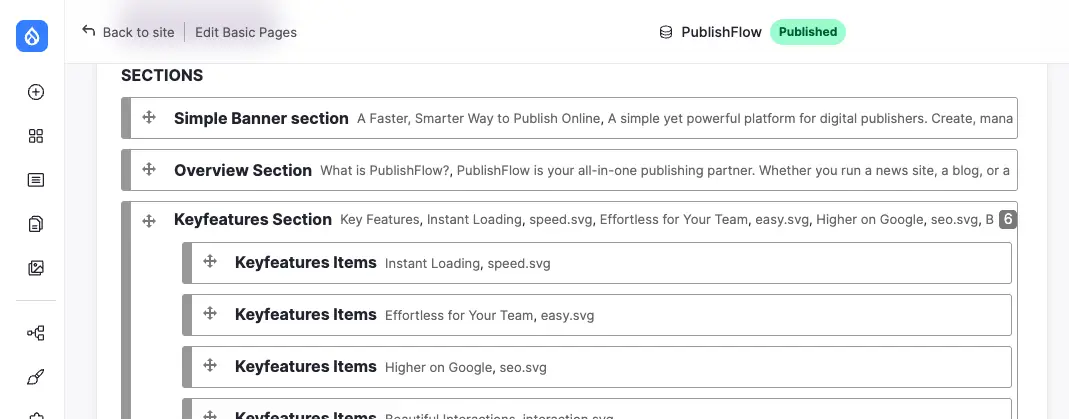
Once that’s done, the business team can rearrange sections, swap content, add new blocks, or delete old ones — all from Drupal — and it shows up correctly on the frontend without a developer needing to touch anything.
For talking to other systems — CRMs, ERPs, marketing tools, analytics — Drupal handles this well through REST APIs, GraphQL, webhooks, and sometimes middleware when a direct connection isn’t practical. Authentication is usually handled through OAuth or JWT to keep things secure.
Performance Matters Too
None of this is worth much if the site is slow, so I also rely on:
- Drupal’s built-in caching and reverse proxy setup, so content is served fast.
- Image styles that automatically convert images to WebP or AVIF and generate the right sizes.
- Lazy loading, so pages don’t load more than they need to upfront.
The Bottom Line
Headless Drupal isn’t really about throwing away Drupal’s frontend — it’s about letting Drupal do what it’s genuinely good at (structured content, translations, editorial workflows) while letting a modern frontend handle what it’s good at (speed, interactivity, flexibility). Once the Paragraphs-to-components pattern is set up, it becomes a system the business team can run on their own — and that’s the real payoff.